
The SQL client that lives in your repo.
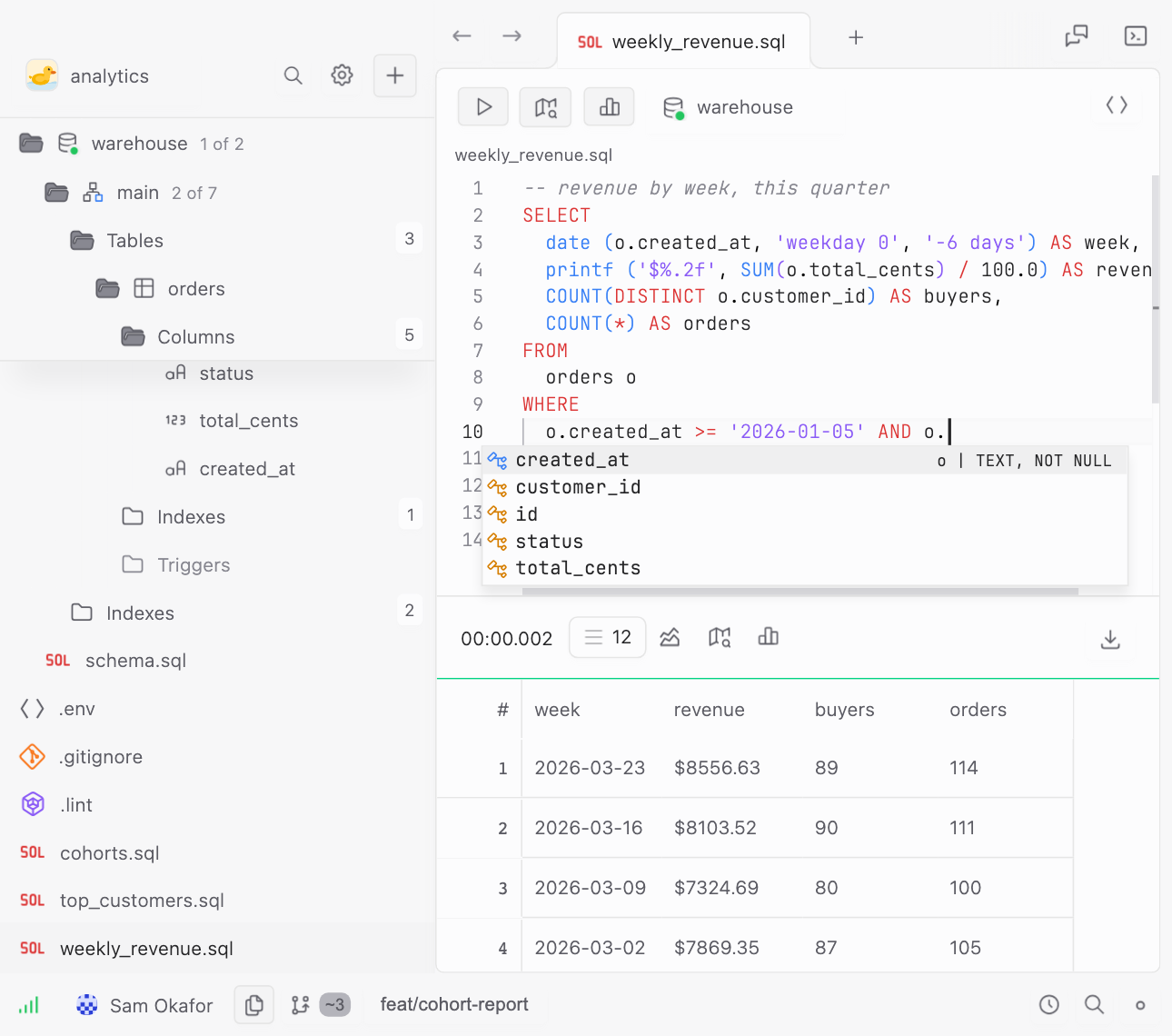
Completion that knows your schema, lint rules your team commits, $variables that resolve from your .env, and hosted databases you or your agent can spin up, fork and throw away. Your queries stay plain .sql files, not tabs in a tool that owns them.
Download for macOS Read the docs
Free and open source · PostgreSQL, MySQL, SQLite · macOS, Windows and Linux
AI enthusiast? Onboard with our skill.
01 · The editor
Completion and lint that read your schema
Point it at PostgreSQL, MySQL or SQLite and it reads the whole schema. Completion gives you real tables, columns, types and keys, not a keyword list, and the graph view draws how they join.
Lint parses your query and checks it against that schema as you type: the column that does not exist, the id that is ambiguous across two joins, the CTE you stopped using, the = NULL that silently matches nothing.
Your own rules go in a file in the repo, scoped by path, so the rule your team agreed on is the rule everyone gets. Cmd+Enter runs. Nothing here needs the mouse.
Lint rules →
02 · The workspace
Review a query like you review code
The last place your team's SQL lived was a Slack thread.
A workspace is a folder of .sql files with names you chose. Branch it, diff it, open a pull request against it, on whatever git host you already use. Your teammate's fix arrives the way every other fix arrives, and git blame works on it.
Git is built in, and optional. A plain folder is still a workspace, and your secrets stay in .env either way.
Git workspaces →
03 · The team
Stop asking someone for prod
Access is usually all or nothing, which is why the answer is usually no. Grant a column instead of a database: four levels of data (database, schema, table, column) and five actions (SELECT, INSERT, UPDATE, DELETE, DDL).
Read orders on production without ever seeing customers.email, and without a DSN on your laptop. Every query through the server lands in an audit log, so "who ran that" has an answer. Narrow enough that someone can finally say yes.
On Teams. Solo connects straight from your machine.
Permissions & proxified connections →
04 · The cellar
A database you can throw away
Somewhere to try a migration, load a CSV, or let an agent build a schema from nothing. Create a database from the app, the API or MCP: SQLite, hosted by us, queried through the same server, behind the same roles and the same audit log.
Fork it at any point in its history before a risky change. Download the .db when you want it on your laptop. An idle database sleeps in object storage and wakes on the next query.
Coming soon, on every plan. Limits under Editions.
Cellar limits →MCP · analyst-sandbox
create_datasource name: "orders-scratch"
✓ orders-scratch · SQLite · 0 B of 250 MB
execute_statement CREATE TABLE orders (...)
✓ 1 table
fork_datasource from: "orders-scratch" at: "09:14"
✓ orders-before-migration
Agents
Give your agent a key, not the keys
You already point Claude Code and Cursor at your repo. Point them at your database the same way. The MCP server exposes seven read and write tools and nothing else: no shell, no filesystem. An API key carries roles, and those roles are exactly what the model can touch, down to the column.
The chat panel in the app runs on the same bounds, with your own API key and your own choice of model.
MCP server & API keys →
Setup
Any project,
in minutes.
Download the app. Open any folder on your machine. Point it at your database, directly or through an SSH tunnel. That is the install. No server to stand up, no agent to run, no migration to apply.
Any project works. A folder you made this morning, a monorepo, a repo six years old. SELECT reads what is already in it and asks you to change nothing.
Editions
Solo is free forever. Pay when your team needs a server between them.
Solo
FreeFOREVER · NOT A TRIAL
- The full client, native, no JVM and no bundled browser
- PostgreSQL, MySQL and SQLite
- Completion, lint, variables, graph view
- Git workspaces, SSH tunnels, AI chat with your own key
- Collaborate through your own git remote
+ Cellar
- 10 hosted databases, 1 GB in total
- 250 MB per database
- Fork from any point in the last day
- Create, fork and download from the app or MCP
COMING SOON
Teams
$12/ SEAT / MONTH$17
BETA PRICE
- Everything in Solo
- Proxified connections: credentials off laptops, encrypted server-side
- Centralised role-based access, down to a single column
- Audit log of every query and grant that runs through the server
- MCP server and API keys, bounded by the same roles
US East today · EU region next
Start a team+ Cellar
- 100 hosted databases, 20 GB in total
- 1 GB per database
- Fork from any point in the last 7 days
- Shared with the team, behind the same roles and audit log
COMING SOON
Enterprise
TalkDEDICATED OR ON-PREM
NOT SHIPPED YET
We are taking design partners now and building it with them. Everything in Teams, plus:
- A dedicated instance in the region you need
- On-premises deployment
- SAML or OIDC single sign-on, with SCIM
- Priority fixes, SLA and a direct line to the maintainers
- Security review and procurement support
+ Cellar
- A dedicated cellar in your region, or on your own servers
- Limits and history window sized to your data
- Replicas in a bucket you own
COMING SOON
Teams is $12 a seat at the beta price, and everyone who joins during the beta keeps that price after it ends.
SQL was never the problem.
The tooling around it was. That is the part we are trying to fix, and it takes five minutes to find out whether we did.